
Antony Rappai

Tech Director & DPO in Education | EdTech Solutions Architect | AI/API & Low-Code Integrationist | Investing Enthusiast

Category: Network & Server Security

  • Thinking about revamping your school website?

    Thinking about revamping your school website?

    I have been trying to convince the School to move away from our overpriced Website hosting provider and moving to a more dynamic, modern website with WordPress and in the process save us at least 20000$ annually.

    Coincidently our Schools 30th anniversary was just around the corner, and our communications dept was in agreement about the facelifting our website, and we conceptualized the idea of our new, improved and revamped school website. How did the process go?


    First and foremost choose your Website platform 

    By website platform I mean a Content Management System (CMS), not to be mistaken for Course Management system like Moodle. There are at least 100 of them. Popular ones include Joomla, Magento (More for E-commerce), Drupal, Django, WordPress.


    What did we decide on?

    We decided to go with WordPress as I had tons of experience with it. Additionally, my mind was fresh of consulting with a couple of other international schools on their move to WordPress and choosing the right Hosting Provider. WordPress has been around for over two decades and has come a long way from being a plain old blogging platform to being capable of hosting large-scale websites with tons of features and modules. Some notable examples of sites on WordPress are

    • TechCrunch.
    • The New Yorker.
    • BBC America.
    • Bloomberg Professional.
    • The Official Star Wars Blog.
    • Variety.
    • Sony Music.
    • MTV News.


    Secure your Web hosting from day zero

    This is one thing that I can not stress enough about since WordPress is widely used, you need to lock it down pretty hard. Just due to its sheer popularity, it has become a very common target for hackers and bots, but there are multiple ways to keep it secure using IP Tables on your Linux server, Using wordfence Plugin, Cloudflare DNS & DDOS, etc.


    What else we need to decide ? or Worry about before getting your feet wet?

    Decide how you are going to host your WordPress

    There are multiple ways to host a WordPress site; you can host directly with WordPress, Amazon Web Services (AWS), Google Cloud. We initially thought about using wordPress.com, but we couldn’t integrate their Hosting plan with our Cloudflare DDOS & DNS, so we went about hosting it on our own Data Center.

    Additional Recommended Components of your Hosting platform if self-hosting or with any Cloud service provider. I won’t be writing in detail about each of the below steps in the setup, I am going to save for another post.

    • Ubuntu: This is the Linux OS that we decided to use, it is lightweight and perfect for hosting WordPress, in fact, it is recommended for WordPress by WordPress, it secure and releases regular security updates.
    • Webmin: This is a web-based GUI that makes managing Linux servers a breeze, it has pre-built scripts to install everything needed for WordPress – that included PHP, MySql, Apache, permissions, it also has pre-built IP Tables modules built-in with a default set of rules, good thing about this is that it opened me to the whole world of IP tables. With Webmin, you can manage a whole lot of aspects about the Linux server, otherwise for which you would have to know a lot of the Linux Shell commands.
    • Cloudflare: Cloudflare is cloud-based Content Delivery Network (CDN) & Web Application Firewall ( WAF ). At the most basic level, this prevents your site from DDOS attacks and caches frequently used files like JPEG, Videos to make your site load faster. Cloudflare is an absolute must if you are using WordPress, this acts as the first layer of defense. I would highly recommend using this for any of your public-facing websites as well. For 20$ month you can get additional WAF ( rules that prevent your site from Cross-site scripting attacks, SQL injection attacks.
    • Wordfence: Wordfence is a long time running IPS/IDS for your WordPress site, this is very popular, and the free version had enough features to keep you away from unwanted traffic, bots, hack attempts. Now you must be thinking but why so much security? Well as I mentioned earlier, the popularity of WordPress is attracting a lot of attention from hackers and bots from around the world, so you have to be careful.


    Choose a good theme that is actively updated and has good support, how do you find that out?

    We went with an excellent theme from ThemeForest, one that was extremely customizable as per our needs and came packed with a ton of features. They have amazing Demos which gives an idea of the functionality that’s packed within. Initially, I was a bit skeptical about using a theme that is very popular because I was worried about it being a target for hackers, but it is better to use a theme that takes security seriously, updates frequently and one that has excellent support.

    The below points are markers for choosing a good theme, keep these points in mind when you select your theme.

    • Good support / Good support portal with FAQ & Support forums.
    • There should be regular updates released, look for changelogs to see how far they have progressed.
    • Check popularity and Reviews of the themes.
    • Look for a theme that is responsive ( where the page adapts to the size of the screen – whether mobile or desktop )
    • Check the community forums for that theme to see how responsive they are.
    • Look for themes that are professionally developed by a team of developers/company rather than one guy.


    Choose a team of four to five members with the below skill set

    • Basic coding skills and ability to understand and explain complex processes, experience with Linux servers, hosting, firewall, SQL, Site migration, etc. ( this guy is me BTW 🙂
    • A person who can take good pictures, video and has an eye for quality photos and editing them
    • A fresh of the boat programming Intern would be nice if your budget allows, to do a lot of the mundane tasks and custom coding, CSS, javascript, etc.
    • A person who can write good content and can follow with departments to clean up the content and give out good ideas like adding certain colors in Elementary school or Adding stat boxes for each division etc.

    You may not need someone with extensive coding knowledge, because in WordPress most of the content and page building is done on a DIY drag & drop editor. It all depends on the Theme that you use. You need to be patient and read through the theme documentation, about 99% of your questions are already answered in the forums and documentation for that particular theme. But none the less it helps to have a person with intermediate coding knowledge.


    What else did we find out?

    You have to factor in at least five months for the whole process. You then need to test it and do a soft launch for one month. A couple of other things you may want to check are, see if all the forms are working, like contact forms for admissions, withdrawal forms, school info, and address, etc.

    • Have weekly milestones
    • Never Rush into this project
    • Meet every week to discuss milestone achievements
    • Form a panel of 5 parents, five staff to test run the site and ask for suggestions


    The End Result 

    From this 
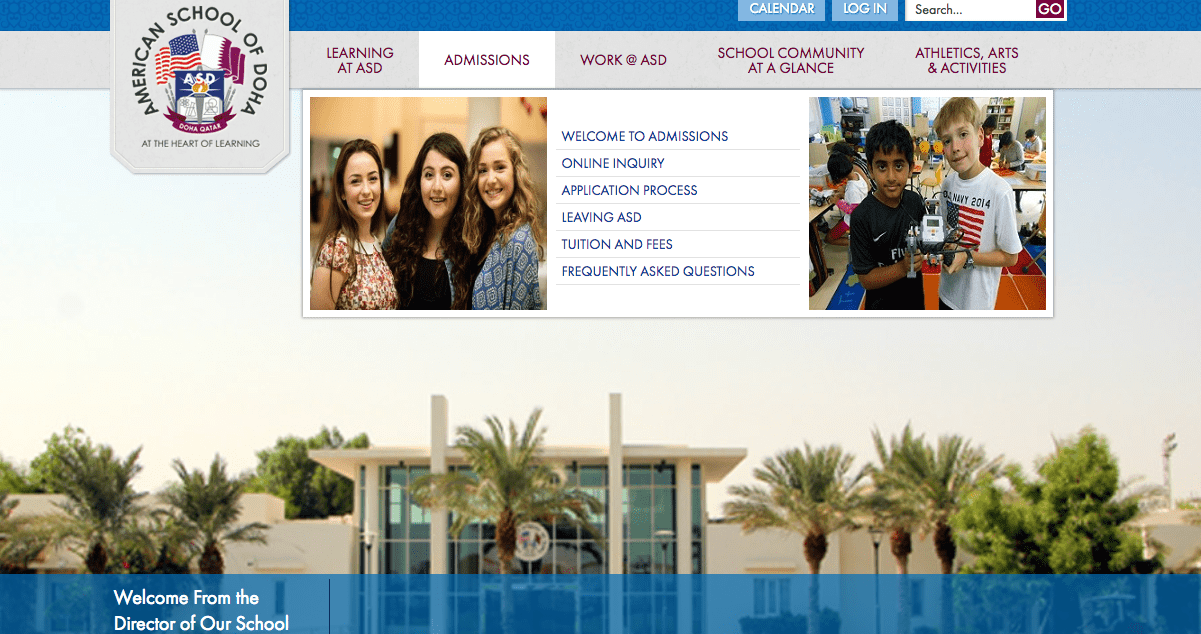
    Screen Shot 2018-10-01 at 9.12.26 PM
    Old School Website


    To this 

    screen-shot-2018-10-01-at-9-14-06-pm.png
    New School Website


    Quite frankly I wouldn’t do this post any justice till you checked out the full website at https://asd.sch.qa


    Do you need help with rebuilding your School website? Need some free consultation? If you are part of a “Not For Profit School”, then please fill in the contact form and get in touch with me.


  • The cyber security plan every school needs

    The cyber security plan every school needs

    Not many schools in today’s world take cybersecurity seriously.Over the last couple of years, we faced some significant security breaches in our school, one instance where our school information system got hacked with the strut vulnerability, and another case was when we had a lot of email accounts hacked as a result of being phished.

    After analyzing for days, we noticed that we were a constant target for bots and hackers for any of our public facing sites, Even if you have a firewall to keep you away from threats you are still susceptible, especially zero-day vulnerabilities and another thing to keep in mind is over 90 % of the attacks are due to human errors ( like submitting your credentials over a phishing link) or users going to the wrong sites.

    To keep up with the ever-growing threat of cyber attacks I came up with a four-pronged approach to keep our school safe from cyber threats

    Four-pronged approach?

    I classified them as

    1. Servers Security
    2. Network Security
    3. Client Computer Security
    4. Cyber Security Awareness / End User Traning 

    1.Server Security

    1.1 Server Software Updates and Patches:In order to protect the servers, we made installed the latest patches and updates on all severe, quite often server administrators think installing patches and updates are not necessary or not very important, but we learned it the hard way when one of our systems got affected with the Apache Strut vulnerability, always schedule a weekly or monthly downtime for your servers to be updated

    1.2 IPS / IDS and Firewall on all servers: We used the ever-reliable Symantec endpoint protection, although it said endpoint protection it worked for our servers too.We left the IPS and IDS at its default setting and configured the firewall to allow traffic to only the required ports.From the logs, it was clear that it was blocking IP address trying to exploit the vulnerabilities

    1.3 CloudFlare (WAF & DDOS): We set up CloudFlare as additional security for any visitors trying to get to our public facing websites like school website or school information system.What CloudFlare does is it creates a barrier between the public cloud and our servers, cloud flare scans the visitor traffic to see if they are genuine or some bots trying to hack. Additionally, it also caches certain aspects of your website.This is basically a WAF (web application firewall), CDN ( Content delivery network ) and DNS server and all this for free , After few weeks of the free version we decided to switch to the 20$/month plan which includes an advanced WAF and a predefined set of rules against vulnerabilities for HTML, PHP, MySQL, WordPress, additionally it consists of a set predefined signature rules. This worked really well for us because we were able to prevent a lot of attacks on our public facing sites being blocked

    Additionally, the free version provides basic DDOS, Ability to block or challenge malicious or blacklisted IP address, apart from that since CloudFlare acted as s DNS server for we no longer required to host additional public-facing DNS servers anymore thereby saving valuable resource on your server infrastructure

    2.Network Security: 

    Every organization has a firewall, right? But have you configured it correctly? Well, check again

    2.1 Layer 3 security: We allowed only incoming traffic to few of our services from the public that we restricted them to specific ports ( like your School information system, websites and Learning management system) the requirements can vary from org to org. It might be beneficial to keep track of the ports and public NAT assignments on a Google Sheet or Excel sheet.

    What about outgoing traffic?

    Generally, it is ok to allow all, we restricted dangerous ports and specific blacklisted IP’s

    since we had the cloud-based Meraki MX 600, we were able to do the following

    2.2 Layer 7 firewall: this gave us the ability to control traffic based on applications like Windows updates, YouTube, AV updates, etc

    2.3 IPS & IDS: this is very important for schools especially when you have 1:1 laptop environment and since the Meraki MX 600 comes with IPS & IDS from Sourcefire and Snort it did a pretty good job of blocking malicious files being downloaded into the school network (ever wondered how to mackeeper at bay 🙂

    2.4 Core Network Switch / Router security enhancements: It would be good practice to have Access Control list to disallow traffic between VLANs, for, e.g., Allowing your guest VLAN to access only the Internet and not any of the internal resources like servers and such

    additionally security on the network switches

    -port security based on sticky Mac to allow only designated IP phones to connect to that particular port

    -shutting down unused ports to prevent unauthorized computers from accessing the school network

    2.4 Wifi network security: Since we had the cloud-based Meraki access points, we could detect and block rogue access points and DHCP servers. Additionally, we could restrict and control traffic based on SSID for, e.g., We could limit traffic like YouTube and updates on per SSID basis. You don’t necessarily need Meraki to implement these changes most if the enterprise wireless systems have these abilities.

    3.Client computer security 

    3.1 Endpoint Security: First and foremost it is absolutely necessary to implement endpoint security, and we opted for the ever-reliable Symantec endpoint security which comes with IPS and IDS. We also took advantage of Symantec Endpoint Security Manager, it is basically a server that communicates with all the clients and is also used to push virus updates to your clients. The dashboard present within the SEPM also gives you a bird’s eye view of the clients that are infected and that have not been updated and also gives you the ability to push firewall policies to all your clients. In short, I can’t stress how important it is to have an anti-virus software for your clients that can be managed by a server and one that provides you a dashboard

    3.2 OpenDNS: How do you protect your student and teacher computers once they are out doing the school network? , I know your answer is probably endpoint security, But I beg to differ, endpoint security or anti-virus software is always a reactive measure, we wanted something more proactive in nature, to be able to prevent the staff from going to the malicious sites and blocking phishing links while they were away from our school network. Last year we had about hundreds of Gmail accounts hacked because a phishing link went viral and if we had the Open DNS we would have been able to block them from being accessed even if they were off campus.

    How does it Work ?: So basically OpenDNS has a roaming client that is installed on the client computers, which means that once installed all the DNS queries are routed through OpenDNS servers, then through the dashboard we can can block website categories like porn, social networks, gambling, this is especially good if you have a 1:1 school network where students take their computers home. It also gives the ability to block malicious website, phishing links, bot network websites, site that contain the virus, download links and URL’s that include viruses, etc. The dashboard gives a good understanding of the clients that have a high number of traffic hitting the malicious websites and which sites and categories were blocked.I used to think this was not necessary,  but in today’s world especially in schools of our size where over two thousand user accounts are susceptible to being hacked, I would highly recommend some kind of cloud-based DNS protection

    4.Cyber Security Awareness / Traning

    Last but not least, user awareness and training are of paramount importance. The schools should have a process where they update the Acceptable / Responsible use policy on a regular basis, set up cyber security awareness weeks where the tech dept along with tech integrators conduct workshops for teachers and students on how to stay safe in cyberspace.

    Check out my Cyber Security google slide presentation ( feel free to use it as a reference )

    Cyber Security Awareness Google Slide