Antony Rappai

Tech Director & DPO in Education | EdTech Solutions Architect | AI/API & Low-Code Integrationist | Investing Enthusiast

Category: Education

  • AWS Educate for the modern day Computer Science classroom

    AWS Educate for the modern day Computer Science classroom

    I always wondered how effectively we could utilize Cloud computing services like AWS, AZURE, and Google Cloud in an educational setting beside using it for offloading our IT Datacenter. Not long after that I was chatting with our IB Computer science teacher and learned of her challenges with implementing an Integrated Code Editor / IDE across a multi-platform environment consisting of Windows, Macs and iPads. It got me thinking and exploring in-depth into what AWS could offer, and that’s when I came across AWS Educate. However, before I dwell into AWS educate

    Firstly what is AWS?
    Amazon Web Services is the Internet and Cloud service wing of the mighty Amazon. Most basically it offers cloud computing/servers as a service or better know as Infrastructure as a service(IAAS). It also provides hundreds of other tools to develop, plan and host your scalable application ( be it a website, game, video hosting services like Netflix or anything else you can think off ), quite honestly it can be a bit overwhelming for the first-timers, but luckily for educational institutions there is a new offering from AWS called AWS educate.

    Screen Shot 2019-04-03 at 4.50.54 PM
    Four Pillars of AWS Educate

    Where Does AWS Educate fit into an educational institution?
    Once enrolled as a teacher in AWS Educate, they are granted a certain amount of free credits to deploy their virtual Lab and enroll students via an Email invite link. To make it more simple, AWS Educate comes with a prebuilt list of Six templates, each of them creating a virtual lab consisting of multiple AWS components depending on the computer science module you are teaching.

    One of the most common use cases for IB computer science would be using the Cloud 9 template, and building scalable websites. Each of these templates enables certain services on AWS that is just enough to start building your project, without having to worry too much about managing those individual components like compute (EC2), storage(S3) and Load Balancers.
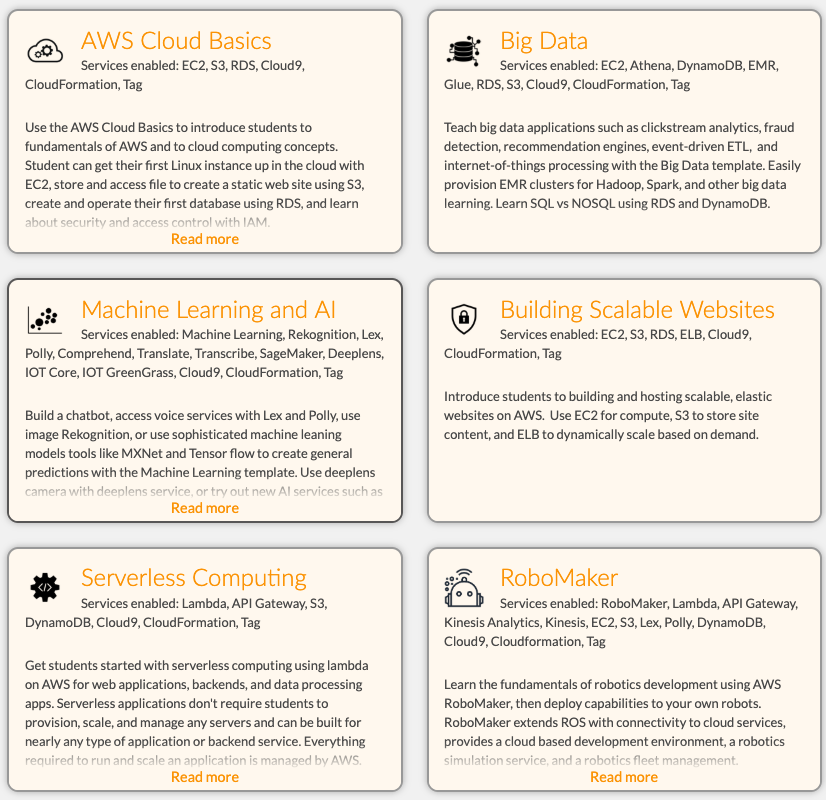
    Screen Shot 2019-04-03 at 4.43.50 PM
    Default AWS Educate Templates

    What is Cloud 9?
    Cloud 9 is a cloud-based code editor and an IDE that works with Python, Java, Ruby, HTML and much more. It is entirely cloud-based, which means no installing software on your computer or IPAD or Android, you can work with your projects anytime, anywhere and on any device.

    -It is a device agnostic ( OSX, IOS, Windows ) cloud-based IDE
    -It Works with different programming languages ( Python, C, Java, Ruby.)
    -Cloud9 allows for collaborating on coding projects between teachers and students like a   Google Doc

    Our move to a multi-platform environment for high school resulted in a device mix of OSX, Windows, and iOS, which made it hard for the teacher to ensure that the app dev environment was installed correctly on the computers let alone the iPads. AWS Cloud9 made it easy to get to the coding part straight away without the hassle of IDE installers, configurations and without worrying about backing up your work or working from another device. AWS Educate and Cloud 9 puts the ball in the teacher’s court by not having to rely on the Technology dept resources or lack thereof.

    Other Challenges that AWS Educate could address in an ever-changing world of technology especially cloud computing

    Most of the curriculum is not relevant when compared to today’s world of cloud computing, IAAS, SAAS, Virtualization. Although they do teach about the theory of computer architecture, networks, software development process/lifecycle, I feel it lacks the new age components of virtualization, containerization, network virtualization, Big data analytics, Artificial intelligence, and virtualization.

    AWS Educate gives the student a sneak peek of upcoming and future job trends. For Eg. What it means to be a full stack developer, DevOps engineer and how the job descriptions or job functions and roles have morphed from being a plain old computer programmer/engineer to a position where he/she needs to understand the complete app dev life cycle. Meaning he needs to have advanced knowledge in DataBases, Front end development, Back end development, UI.

    AWS Educate further enhances students knowledge in cloud-based networking, Web application firewall and the relevance of cloud computing in today’s world. They also gain a whole lot of exposure to Machine learning and Big Data Analytics – the role of AI in today’s computing world and how you can leverage the AWS platform with tools like Deep lens, Polly, EC2.

    Understanding cloud service offerings form AWS, Google cloud or Azure gives them a holistic view of web application development and transition of applications from the desktop to the internet/cloud.

    Another thing that could spark the interest of the young computer science enthusiasts across the globe is the AWS Educate Badges. Badges are a set of interactive courses build on Canvas LMS tailored for K-12, AWS Educate badges come in three flavors.

    • Cloud Explorer (all about cloud computing basics, data models, online privacy, algorithms)
    • Cloud Inventor  ( all about hardware & software, programming basics, data safety,   and redundancy)
    • Cloud Builder ( more about AWS core services related to  AWS Console, Cloud Storage, Cloud Compute, IOT Integration )

    AWS Educate also has something called Career pathways for the more career-oriented IT Professionals. AWS Educate’s Cloud Career Pathways helps you to start building the critical cloud skills you’ll need to be successful in leading technology careers. It lets you earn a completion credential for each pathway and share with prospective employers what you’ve learned.

    Screen Shot 2019-04-03 at 4.45.12 PM
    AWS Career Pathways

    The major cloud service providers like Microsoft Azure and Google Cloud platform has also come up with their own educational offerings; I anticipate more mid-level service providers like Digital Ocean and Heroku to come up with their own offerings. I would highly recommend piloting with AWS educate to expose today’s young computer science enthusiasts to tomorrow’s demand for new age technology jobs.

    Let me know your thoughts in the comments below or contact me if you would like to chat a bit more of my journey with AWS Educate.
    Sorry! This product is not available for purchase at this time.
  • Why Schools Should Move to a Hyper-converged Infrastructure

    Why Schools Should Move to a Hyper-converged Infrastructure

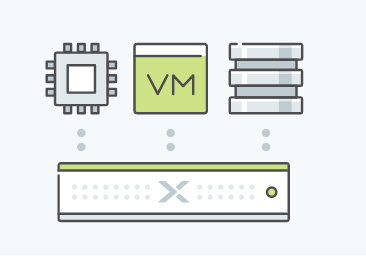
    It’s no secret that the legacy IT infrastructure is at risk of failure, threatened by the growing demands of future enterprise applications and the nature of modern business. Having separate storage networks and servers results in the creation of silos which prove to be a barrier to the evolution of the infrastructure and add complexity to every single step from deployment to management. So what’s in the store for most modern businesses in the coming times? It’s Hyper-converged Infrastructure. Read on to learn more about this topic and understand why schools need to move to a Hyper-converged Infrastructure.

    Evolution of the IT Infrastructure Until the early 2000s, physical infrastructure, which comprised of a traditional data center, was the norm. Between 2003 and 2010, companies started the adoption of virtualized data centers as the virtualization revolution made it easy to pool together the resources of the network, computing, and storage from multiple siloed data centers to form a central, more reliable and flexible resource which could be reallocated based on the requirements. By 2011, close to 72% of organizations claimed at least 25% of their data centers were virtual. Then came the age of SAN and use of fiber channels, and IT infrastructure seemed to evolve rapidly. Fast forward to today, one of the significant challenges in IT today is that organizations tend to spend 70 to 80 percent of their total budget on operations alone, which includes optimization and maintenance of the infrastructure. Server virtualization did offer the benefit of improved utilization of computing resources but had a negative impact on the networking and storage components. So, for IT, though server virtualization wasn’t the definitive answer, it was a step closer to the ultimate solution – hyper-converged infrastructure (HCI).  It makes sense for organizations to move to environments that are relatively easy to manage and require much lesser resources to maintain.

    So, there are mainly two options available: Make the environment simplified by using a hyper-converged infrastructure, or outsource all (or part) of the Infra to some third-party cloud provider which can be a very costly affair (more on this later). What Are the Main Benefits of Using Hyper-converged Infrastructure?


    1. Simplified Datacenter Operations: By using hyper-converged infrastructure, it becomes possible to streamline the deployment, management and consequent scaling of the data center resources by merging x86-based server and storage resources along with an intelligent software solution. Instead of using separate servers, storage arrays and storage networks, we can go with a hyper-converged infrastructure solution and create an agile datacenter which can scale as your needs grow.

    2.Ability to Extend to the Public Cloud: Both HCI and the public cloud leverage flash-enabled servers along with a software abstraction layer which is hardware-agnostic. As a result of having a standard hardware building block and an architectural affinity, it becomes possible to extend the common storage control planes of HCI to the public cloud

    3.Cost Savings: An efficient HCI design results in as much as 40 to 60 percent savings on costs by eliminating the need for separate storage networking hardware and proprietary storage. This significant economic benefit will drive the adoption of HCI in scenarios where cost savings are required. Furthermore, HCI reduces operational costs by up to 50 percent by consolidating the storage and virtual computing management into one management console. In the case of HCI, there’s no need to have independent storage administrators as storage is just an attribute of a virtual machine.


    Case Study: American School of Doha

    This example will help you understand the nature of benefits that HCI offers. While I was the Sytems and Network Admin there, I proposed, researched and helped implement the Hyper-Converged Nutanix Infrastructure. Here are some of the challenges that I was trying to solve

    • Management overheads
    • A high amount of time required for maintenance
    • Significant licensing costs
    • Limited physical space
    • The need for a separate SAN and Virtualization specialist.

    We had to make a tough call between Cisco Hyper-Converged Infra and the Nutanix Hyper-Converged Infra, in the end, we were convinced that Nutanix was the way to go. They were the pioneers and the ability to use the inbuilt Nutanix Hypervisor and not having to manage a separate layer of hypervisor like Vmware or Citrix on top of the HCI was a huge benefit for us in terms of licensing and time spent.

    Considering downsides that come with the infrastructure that relies on traditional SAN’s and Blade Servers, it made complete sense to switch to the Nutanix Hyper-Converged Infrastructure in this case. The transition resulted in significant cost savings plus other hosts of benefits that I’ve shared above. The need to improve efficiency Not only will it be easy to deploy, manage and scale an HCI, but it will also be far more efficient as compared to a traditional virtualization solution that your school might be currently using. This means lesser overheads and better performance. This point alone makes it a no-brainer to go for HCI than a SAN solution. Ask yourself, What would you want your school’s tech department to focus on: helping teachers and students in teaching and learning OR managing the infrastructure? The answer is simple: helping teachers and students! It just makes sense for your tech staff to focus on the more critical aspects like this rather than solving technical redundancies. It’s all about priorities and what matters to you the most, so pick your options wisely!

    Conclusion:  By relying on HCI solutions such as Nutanix. It becomes less time-consuming to maintain the server infrastructure. As a result, it frees up the time of your tech staff to focus more on helping teachers and students, This way your school can achieve far better results from the available resources (staff and operation costs). So if you want to gain the host of benefits that come with hyper-converged infrastructure, maybe it’s time to switch. Just like the significant success of the IT infrastructure changes I helped carry out at the American School of Doha, your school too can lead the wave of change 

    Thanks for reading this article! Share your views on this topic in the comments section below. Good luck!


  • Thinking about revamping your school website?

    Thinking about revamping your school website?

    I have been trying to convince the School to move away from our overpriced Website hosting provider and moving to a more dynamic, modern website with WordPress and in the process save us at least 20000$ annually.

    Coincidently our Schools 30th anniversary was just around the corner, and our communications dept was in agreement about the facelifting our website, and we conceptualized the idea of our new, improved and revamped school website. How did the process go?


    First and foremost choose your Website platform 

    By website platform I mean a Content Management System (CMS), not to be mistaken for Course Management system like Moodle. There are at least 100 of them. Popular ones include Joomla, Magento (More for E-commerce), Drupal, Django, WordPress.


    What did we decide on?

    We decided to go with WordPress as I had tons of experience with it. Additionally, my mind was fresh of consulting with a couple of other international schools on their move to WordPress and choosing the right Hosting Provider. WordPress has been around for over two decades and has come a long way from being a plain old blogging platform to being capable of hosting large-scale websites with tons of features and modules. Some notable examples of sites on WordPress are

    • TechCrunch.
    • The New Yorker.
    • BBC America.
    • Bloomberg Professional.
    • The Official Star Wars Blog.
    • Variety.
    • Sony Music.
    • MTV News.


    Secure your Web hosting from day zero

    This is one thing that I can not stress enough about since WordPress is widely used, you need to lock it down pretty hard. Just due to its sheer popularity, it has become a very common target for hackers and bots, but there are multiple ways to keep it secure using IP Tables on your Linux server, Using wordfence Plugin, Cloudflare DNS & DDOS, etc.


    What else we need to decide ? or Worry about before getting your feet wet?

    Decide how you are going to host your WordPress

    There are multiple ways to host a WordPress site; you can host directly with WordPress, Amazon Web Services (AWS), Google Cloud. We initially thought about using wordPress.com, but we couldn’t integrate their Hosting plan with our Cloudflare DDOS & DNS, so we went about hosting it on our own Data Center.

    Additional Recommended Components of your Hosting platform if self-hosting or with any Cloud service provider. I won’t be writing in detail about each of the below steps in the setup, I am going to save for another post.

    • Ubuntu: This is the Linux OS that we decided to use, it is lightweight and perfect for hosting WordPress, in fact, it is recommended for WordPress by WordPress, it secure and releases regular security updates.
    • Webmin: This is a web-based GUI that makes managing Linux servers a breeze, it has pre-built scripts to install everything needed for WordPress – that included PHP, MySql, Apache, permissions, it also has pre-built IP Tables modules built-in with a default set of rules, good thing about this is that it opened me to the whole world of IP tables. With Webmin, you can manage a whole lot of aspects about the Linux server, otherwise for which you would have to know a lot of the Linux Shell commands.
    • Cloudflare: Cloudflare is cloud-based Content Delivery Network (CDN) & Web Application Firewall ( WAF ). At the most basic level, this prevents your site from DDOS attacks and caches frequently used files like JPEG, Videos to make your site load faster. Cloudflare is an absolute must if you are using WordPress, this acts as the first layer of defense. I would highly recommend using this for any of your public-facing websites as well. For 20$ month you can get additional WAF ( rules that prevent your site from Cross-site scripting attacks, SQL injection attacks.
    • Wordfence: Wordfence is a long time running IPS/IDS for your WordPress site, this is very popular, and the free version had enough features to keep you away from unwanted traffic, bots, hack attempts. Now you must be thinking but why so much security? Well as I mentioned earlier, the popularity of WordPress is attracting a lot of attention from hackers and bots from around the world, so you have to be careful.


    Choose a good theme that is actively updated and has good support, how do you find that out?

    We went with an excellent theme from ThemeForest, one that was extremely customizable as per our needs and came packed with a ton of features. They have amazing Demos which gives an idea of the functionality that’s packed within. Initially, I was a bit skeptical about using a theme that is very popular because I was worried about it being a target for hackers, but it is better to use a theme that takes security seriously, updates frequently and one that has excellent support.

    The below points are markers for choosing a good theme, keep these points in mind when you select your theme.

    • Good support / Good support portal with FAQ & Support forums.
    • There should be regular updates released, look for changelogs to see how far they have progressed.
    • Check popularity and Reviews of the themes.
    • Look for a theme that is responsive ( where the page adapts to the size of the screen – whether mobile or desktop )
    • Check the community forums for that theme to see how responsive they are.
    • Look for themes that are professionally developed by a team of developers/company rather than one guy.


    Choose a team of four to five members with the below skill set

    • Basic coding skills and ability to understand and explain complex processes, experience with Linux servers, hosting, firewall, SQL, Site migration, etc. ( this guy is me BTW 🙂
    • A person who can take good pictures, video and has an eye for quality photos and editing them
    • A fresh of the boat programming Intern would be nice if your budget allows, to do a lot of the mundane tasks and custom coding, CSS, javascript, etc.
    • A person who can write good content and can follow with departments to clean up the content and give out good ideas like adding certain colors in Elementary school or Adding stat boxes for each division etc.

    You may not need someone with extensive coding knowledge, because in WordPress most of the content and page building is done on a DIY drag & drop editor. It all depends on the Theme that you use. You need to be patient and read through the theme documentation, about 99% of your questions are already answered in the forums and documentation for that particular theme. But none the less it helps to have a person with intermediate coding knowledge.


    What else did we find out?

    You have to factor in at least five months for the whole process. You then need to test it and do a soft launch for one month. A couple of other things you may want to check are, see if all the forms are working, like contact forms for admissions, withdrawal forms, school info, and address, etc.

    • Have weekly milestones
    • Never Rush into this project
    • Meet every week to discuss milestone achievements
    • Form a panel of 5 parents, five staff to test run the site and ask for suggestions


    The End Result 

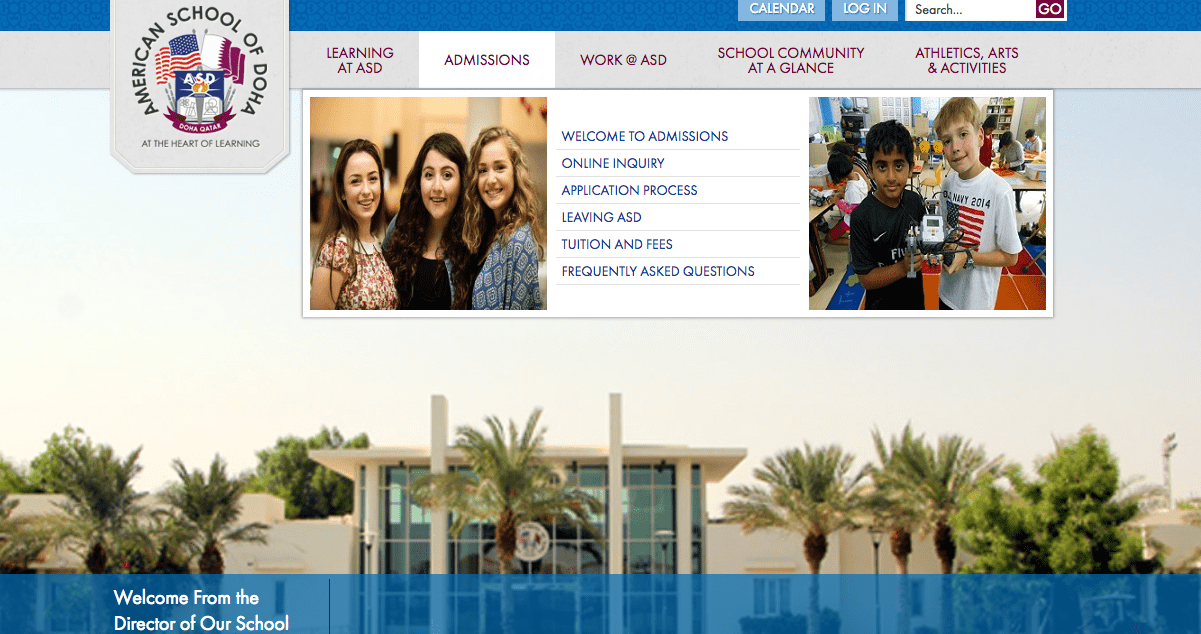
    From this 

    Screen Shot 2018-10-01 at 9.12.26 PM
    Old School Website


    To this 

    screen-shot-2018-10-01-at-9-14-06-pm.png
    New School Website


    Quite frankly I wouldn’t do this post any justice till you checked out the full website at https://asd.sch.qa


    Do you need help with rebuilding your School website? Need some free consultation? If you are part of a “Not For Profit School”, then please fill in the contact form and get in touch with me.


  • Fix it yourself with Sugru

    Fix it yourself with Sugru

    My passion for investing and venture capitalism sparked my interests in Sugru, and I don’t regret this one bit. Jane Ní Dhulchaointigh developed Sugru in Ireland, a student of product design. She came up with the idea in 2003 when she was studying her post-graduate studies at the Royal College of Art.

    It is mouldable glue, and the best way to describe it is to call it a love child between play dough and super glue. The moment you take it out of its packaging, it feels as soft as play-dough and can be rolled into various shapes. Once out of the package, you have thirty minutes to shape it as you wish. Then the glue self-cures and hardens after twenty-four hours and stays that way. Sugru is also waterproof and durable. Sugru sticks on to mostly anything, be it wood, plastic, or metal, and it can then be molded into whatever shape you would like. You have half an hour to break it down and build it back up as many times as you would like. Sugru can actually be used in real life scenarios from fixing charging cables, earphones, hanging picture frames on to your wall, putting back broken pieces of the vase together, The possibilities are endless.

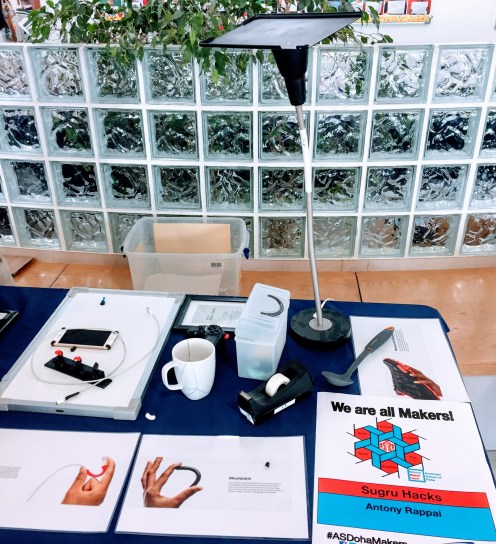
    After some research and free samples, I decided to introduce it to our very first Amercian School of Doha’s  Maker Faire event because I thought it would spark the children’s creativity and interest in fixing things.

    img_0004-1.jpg
    My Sugru Maker Faire Booth

    I modified my PS4 controller to make it more ergonomic ( I am winning more FIFA games now, or maybe it is just a coincidence ). There was an old IKEA Lamp that never got used, and I converted that into a customized IPAD stand.
    Introducing something like this in schools can change the way children think. It could spark their creativity. Perhaps this could be integrated into the maker space for elementary and middle schools.

    In the midst of adding too much Technology, 1:1 laptops, Coding and Robots this could be a refreshing addition to work the young learner’s mind.