Amidst all the AI apps for education, I’m hoping the next wave will help us tackle unique organizational issues—not just enhance lesson plans, grading, and assessments.
I’ve been experimenting with AI to address some of these challenges. For example, how can a teacher turn a simple request like:
“I want to add an event called ‘Lunch Duty’ on all Rotation Days 3 & 4, Period 3.”
Into a CSV file of events?
Let’s say a school operates on an 8-day rotation schedule, so rotation days sometimes fall on different weekdays. I used OpenAI’s Assistant API, uploading our rotation day-to-calendar date schedule and period times as CSV files to the Code Interpreter, and developed an elaborate prompt.
However, no matter how I prompt it, the output initially creates the event only for the first occurrence of those rotation days. It generates all 100+ events only after prompting again. While the API works well for generating large text content and lesson plans, it seems less effective for producing large datasets.
Also, it’s not cheap to do it that way—about 54,000 tokens for Assitant API to generate about 500 rows using code interpreter—so it may not be economical. In the end, my reflections are that it might be best to collect those inputs from teachers in a structured format and just run good old JavaScript, or perhaps offload text to an OpenAI API to return a structured JSON using OpenAI API Functions and then process that in your app or code.
My questions to the community are:
Has anyone gotten a large structured output in the first prompt using OpenAI API (either via an assistant, completions, functions, or code interpreter)?
Does anyone have experience using open-source language models for tasks like this?
I aim to embed this functionality into the Bulk Google Calendar Editor Add-on that I built so teachers can easily add these one-off events, like lunch breaks or taking a particular block for three months, etc., to their calendars.
Considering all the AI tools for education, I’m eager to find solutions that help with practical administrative tasks or challenges that schools may face. Any insights or experiences would be greatly appreciated!
In the rapidly evolving world of technology, APIs have become indispensable tools for fostering innovation and efficiency. During my tenure at the Overseas School of Colombo (OSC), I often pondered how we could refine our systems. What should an ideal MIS, LMS, or SIS encompass? My exploration led me to delve into APIs, databases, programming, and notably, JavaScript. My primary goal was to achieve optimal efficiency without escalating costs. Through APIs, I crafted tailored solutions that addressed OSC’s unique challenges.
Essential Tools in My Arsenal:
Postman: My go-to for API testing. The exhilaration I felt when I executed my first API endpoints for Open Apply was unparalleled.
Airtable: A versatile tool that, in my opinion, has the potential to replace traditional SIS. Its features like views, Gantt charts, and extensions are commendable.
Low-code Tools: Platforms like Parabola and n8n were instrumental in integrating API endpoints with Airtable, allowing me to delve deeper into APIs with minimal coding.
JavaScript: To navigate the initial limitations of low-code tools, I ventured into JavaScript. Mastering data extraction, manipulation, and understanding objects, properties, and arrays was an enlightening journey.
My experiments culminated in the establishment of a student information system on Airtable, seamlessly synchronized with OpenApply, our admissions database. This is where the prowess of low-code tools shone. Parabola, especially, was a cost-effective solution that offered immense value. By connecting to the OpenApply API, I could extract data and subsequently feed it into the Airtable API. This facilitated the creation of dynamic views, such as lists of parents without mobile numbers, students with single parents, and more. Essentially, I had crafted an SIS.
Automations that Transformed Our Workflow:
Teacher Schedules Integration: I devised a system to feed teacher schedules from Managebac into Google Calendar. Overcoming the challenges posed by Managebac’s API limitations was no easy task. By amalgamating data from various sources like ASC Timetable Scheduler and Google Calendar, I successfully streamlined all schedules into a centralized calendar.
Syncing Classes & Students: Google Classroom lacked a bulk creation utility for classes and students. By harnessing data from Managebac’s API and using Parabola, I seamlessly synced classes and students from Managebac to Google Classroom.
Bulk Updates in Managebac: I utilized Airtable to bulk update student homeroom advisors and courses in Managebac using Parabola as the data integration middleware that would be invoked by a incoming web-hook.
These are just a few examples of the numerous automations I implemented. For a comprehensive overview, you can watch my presentation at the Faria Tech Conference 2022, where I delve deeper into my API journey.
I always wondered how effectively we could utilize Cloud computing services like AWS, AZURE, and Google Cloud in an educational setting beside using it for offloading our IT Datacenter. Not long after that I was chatting with our IB Computer science teacher and learned of her challenges with implementing an Integrated Code Editor / IDE across a multi-platform environment consisting of Windows, Macs and iPads. It got me thinking and exploring in-depth into what AWS could offer, and that’s when I came across AWS Educate. However, before I dwell into AWS educate
Firstly what is AWS?
Amazon Web Services is the Internet and Cloud service wing of the mighty Amazon. Most basically it offers cloud computing/servers as a service or better know as Infrastructure as a service(IAAS). It also provides hundreds of other tools to develop, plan and host your scalable application ( be it a website, game, video hosting services like Netflix or anything else you can think off ), quite honestly it can be a bit overwhelming for the first-timers, but luckily for educational institutions there is a new offering from AWS called AWS educate.
Four Pillars of AWS Educate
Where Does AWS Educate fit into an educational institution?
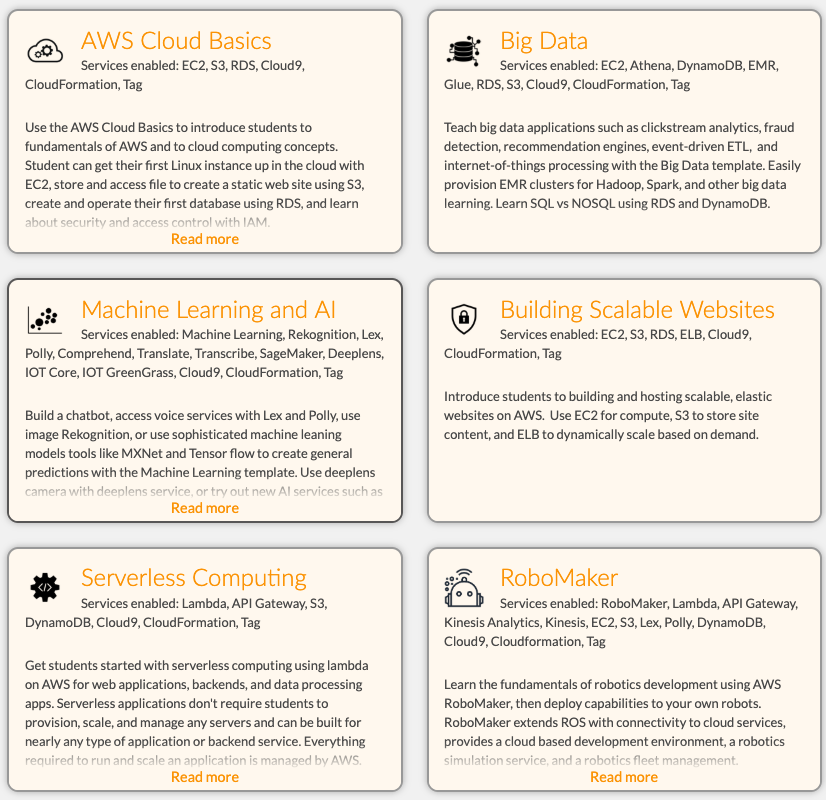
Once enrolled as a teacher in AWS Educate, they are granted a certain amount of free credits to deploy their virtual Lab and enroll students via an Email invite link. To make it more simple, AWS Educate comes with a prebuilt list of Six templates, each of them creating a virtual lab consisting of multiple AWS components depending on the computer science module you are teaching.
One of the most common use cases for IB computer science would be using the Cloud 9 template, and building scalable websites. Each of these templates enables certain services on AWS that is just enough to start building your project, without having to worry too much about managing those individual components like compute (EC2), storage(S3) and Load Balancers.
Default AWS Educate Templates
What is Cloud 9?
Cloud 9 is a cloud-based code editor and an IDE that works with Python, Java, Ruby, HTML and much more. It is entirely cloud-based, which means no installing software on your computer or IPAD or Android, you can work with your projects anytime, anywhere and on any device.
-It is a device agnostic ( OSX, IOS, Windows ) cloud-based IDE
-It Works with different programming languages ( Python, C, Java, Ruby.)
-Cloud9 allows for collaborating on coding projects between teachers and students like a Google Doc
Our move to a multi-platform environment for high school resulted in a device mix of OSX, Windows, and iOS, which made it hard for the teacher to ensure that the app dev environment was installed correctly on the computers let alone the iPads. AWS Cloud9 made it easy to get to the coding part straight away without the hassle of IDE installers, configurations and without worrying about backing up your work or working from another device. AWS Educate and Cloud 9 puts the ball in the teacher’s court by not having to rely on the Technology dept resources or lack thereof.
Other Challenges that AWS Educate could address in an ever-changing world of technology especially cloud computing
Most of the curriculum is not relevant when compared to today’s world of cloud computing, IAAS, SAAS, Virtualization. Although they do teach about the theory of computer architecture, networks, software development process/lifecycle, I feel it lacks the new age components of virtualization, containerization, network virtualization, Big data analytics, Artificial intelligence, and virtualization.
AWS Educate gives the student a sneak peek of upcoming and future job trends. For Eg. What it means to be a full stack developer, DevOps engineer and how the job descriptions or job functions and roles have morphed from being a plain old computer programmer/engineer to a position where he/she needs to understand the complete app dev life cycle. Meaning he needs to have advanced knowledge in DataBases, Front end development, Back end development, UI.
AWS Educate further enhances students knowledge in cloud-based networking, Web application firewall and the relevance of cloud computing in today’s world. They also gain a whole lot of exposure to Machine learning and Big Data Analytics – the role of AI in today’s computing world and how you can leverage the AWS platform with tools like Deep lens, Polly, EC2.
Understanding cloud service offerings form AWS, Google cloud or Azure gives them a holistic view of web application development and transition of applications from the desktop to the internet/cloud.
Another thing that could spark the interest of the young computer science enthusiasts across the globe is the AWS Educate Badges. Badges are a set of interactive courses build on Canvas LMS tailored for K-12, AWS Educate badges come in three flavors.
Cloud Explorer (all about cloud computing basics, data models, online privacy, algorithms)
Cloud Inventor ( all about hardware & software, programming basics, data safety, and redundancy)
Cloud Builder ( more about AWS core services related to AWS Console, Cloud Storage, Cloud Compute, IOT Integration )
AWS Educate also has something called Career pathways for the more career-oriented IT Professionals. AWS Educate’s Cloud Career Pathways helps you to start building the critical cloud skills you’ll need to be successful in leading technology careers. It lets you earn a completion credential for each pathway and share with prospective employers what you’ve learned.
AWS Career Pathways
The major cloud service providers like Microsoft Azure and Google Cloud platform has also come up with their own educational offerings; I anticipate more mid-level service providers like Digital Ocean and Heroku to come up with their own offerings. I would highly recommend piloting with AWS educate to expose today’s young computer science enthusiasts to tomorrow’s demand for new age technology jobs.
Let me know your thoughts in the comments below or contact me if you would like to chat a bit more of my journey with AWS Educate.
Sorry! This product is not available for purchase at this time.
It’s no secret that the legacy IT infrastructure is at risk of failure, threatened by the growing demands of future enterprise applications and the nature of modern business. Having separate storage networks and servers results in the creation of silos which prove to be a barrier to the evolution of the infrastructure and add complexity to every single step from deployment to management. So what’s in the store for most modern businesses in the coming times? It’s Hyper-converged Infrastructure. Read on to learn more about this topic and understand why schools need to move to a Hyper-converged Infrastructure.
Evolution of the IT Infrastructure Until the early 2000s, physical infrastructure, which comprised of a traditional data center, was the norm. Between 2003 and 2010, companies started the adoption of virtualized data centers as the virtualization revolution made it easy to pool together the resources of the network, computing, and storage from multiple siloed data centers to form a central, more reliable and flexible resource which could be reallocated based on the requirements. By 2011, close to 72% of organizations claimed at least 25% of their data centers were virtual. Then came the age of SAN and use of fiber channels, and IT infrastructure seemed to evolve rapidly. Fast forward to today, one of the significant challenges in IT today is that organizations tend to spend 70 to 80 percent of their total budget on operations alone, which includes optimization and maintenance of the infrastructure. Server virtualization did offer the benefit of improved utilization of computing resources but had a negative impact on the networking and storage components. So, for IT, though server virtualization wasn’t the definitive answer, it was a step closer to the ultimate solution – hyper-converged infrastructure (HCI). It makes sense for organizations to move to environments that are relatively easy to manage and require much lesser resources to maintain.
So, there are mainly two options available: Make the environment simplified by using a hyper-converged infrastructure, or outsource all (or part) of the Infra to some third-party cloud provider which can be a very costly affair (more on this later). What Are the Main Benefits of Using Hyper-converged Infrastructure?
Good old way
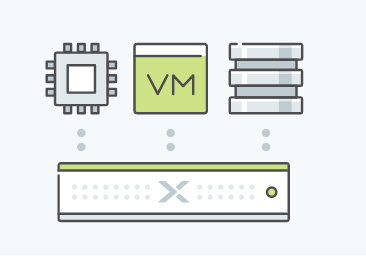
The new way
1. Simplified Datacenter Operations: By using hyper-converged infrastructure, it becomes possible to streamline the deployment, management and consequent scaling of the data center resources by merging x86-based server and storage resources along with an intelligent software solution. Instead of using separate servers, storage arrays and storage networks, we can go with a hyper-converged infrastructure solution and create an agile datacenter which can scale as your needs grow.
2.Ability to Extend to the Public Cloud: Both HCI and the public cloud leverage flash-enabled servers along with a software abstraction layer which is hardware-agnostic. As a result of having a standard hardware building block and an architectural affinity, it becomes possible to extend the common storage control planes of HCI to the public cloud
3.Cost Savings: An efficient HCI design results in as much as 40 to 60 percent savings on costs by eliminating the need for separate storage networking hardware and proprietary storage. This significant economic benefit will drive the adoption of HCI in scenarios where cost savings are required. Furthermore, HCI reduces operational costs by up to 50 percent by consolidating the storage and virtual computing management into one management console. In the case of HCI, there’s no need to have independent storage administrators as storage is just an attribute of a virtual machine.
Case Study: American School of Doha
This example will help you understand the nature of benefits that HCI offers. While I was the Sytems and Network Admin there, I proposed, researched and helped implement the Hyper-Converged Nutanix Infrastructure. Here are some of the challenges that I was trying to solve
Management overheads
A high amount of time required for maintenance
Significant licensing costs
Limited physical space
The need for a separate SAN and Virtualization specialist.
We had to make a tough call between Cisco Hyper-Converged Infra and the Nutanix Hyper-Converged Infra, in the end, we were convinced that Nutanix was the way to go. They were the pioneers and the ability to use the inbuilt Nutanix Hypervisor and not having to manage a separate layer of hypervisor like Vmware or Citrix on top of the HCI was a huge benefit for us in terms of licensing and time spent.
Considering downsides that come with the infrastructure that relies on traditional SAN’s and Blade Servers, it made complete sense to switch to the Nutanix Hyper-Converged Infrastructure in this case. The transition resulted in significant cost savings plus other hosts of benefits that I’ve shared above. The need to improve efficiency Not only will it be easy to deploy, manage and scale an HCI, but it will also be far more efficient as compared to a traditional virtualization solution that your school might be currently using. This means lesser overheads and better performance. This point alone makes it a no-brainer to go for HCI than a SAN solution. Ask yourself, What would you want your school’s tech department to focus on: helping teachers and students in teaching and learning OR managing the infrastructure? The answer is simple: helping teachers and students! It just makes sense for your tech staff to focus on the more critical aspects like this rather than solving technical redundancies. It’s all about priorities and what matters to you the most, so pick your options wisely!
Conclusion: By relying on HCI solutions such as Nutanix. It becomes less time-consuming to maintain the server infrastructure. As a result, it frees up the time of your tech staff to focus more on helping teachers and students, This way your school can achieve far better results from the available resources (staff and operation costs). So if you want to gain the host of benefits that come with hyper-converged infrastructure, maybe it’s time to switch. Just like the significant success of the IT infrastructure changes I helped carry out at the American School of Doha, your school too can lead the wave of change
Thanks for reading this article! Share your views on this topic in the comments section below. Good luck!





 Antony Rappai